01
Every trip is recorded
The tracker logs each drive on its own: date, start and end time, start and end address, and distance. Nobody has to open an app or write anything down.
A GPS tracker logs every trip. Your business hours tag each one business or private, and you fix the odd one with a tap on your phone. Export the travel sheet for SARS. R50 a month, with live tracking and alerts included. No contract.
A tracker in the vehicle records every trip. Trips that start inside your business hours are tagged business, the rest private. You correct the exceptions in the app and export a travel sheet for your accountant. There’s nothing to remember to switch on.
The tracker logs each drive on its own: date, start and end time, start and end address, and distance. Nobody has to open an app or write anything down.
Trips that start inside your account’s business-hours window are tagged Business. Everything else is tagged Private. The window matches your own working days and times.
A Saturday site visit or a lunchtime school run? Tap Business or Private under that drive in the app, or set an override on the web platform.
Pull the business and private travel sheet in PDF or Excel, or schedule it to email itself monthly. Hand it to your accountant with your odometer readings.
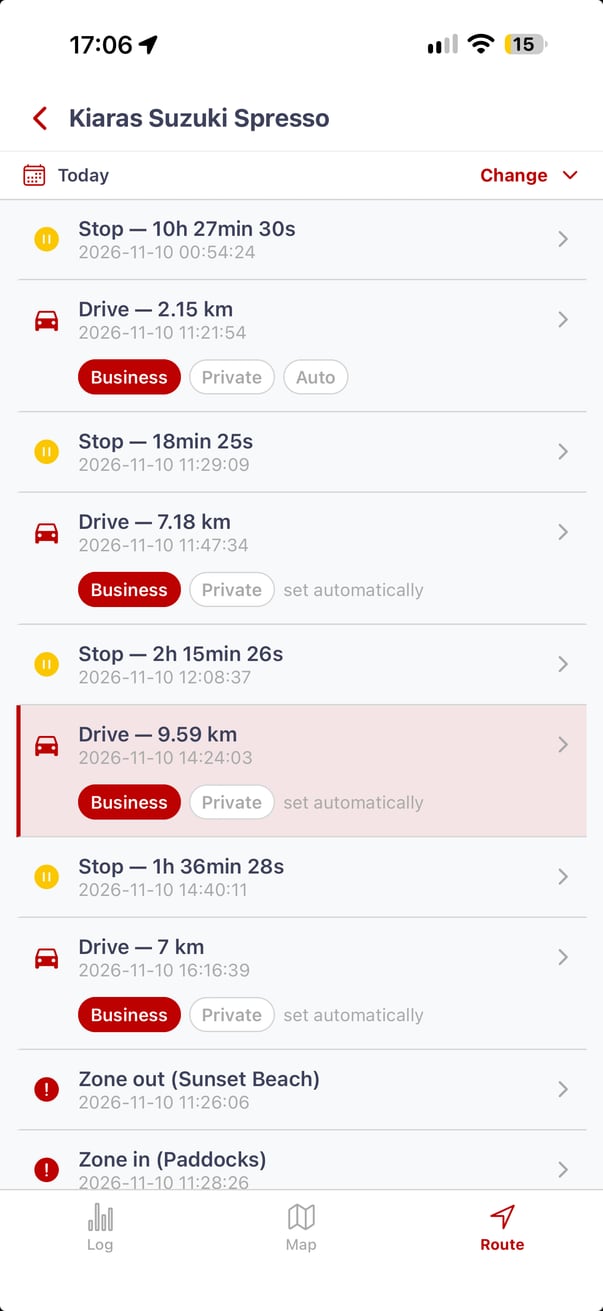
Open the vehicle’s history in the app and go to the Route list. Every drive has a Business and a Private button. Tap the one that matches the trip, and the travel sheet updates with it. It works the same on iPhone and Android.
Trips the schedule tagged for you say “set automatically”. Once you change one by hand, an Auto button appears, which hands the trip back to your business-hours schedule if you change your mind.
On the web platform, the same corrections are made with Route types overrides. See the step-by-step logbook guide. Don’t see the buttons under your drives? WhatsApp 083 399 9937 and we’ll switch it on for your account.
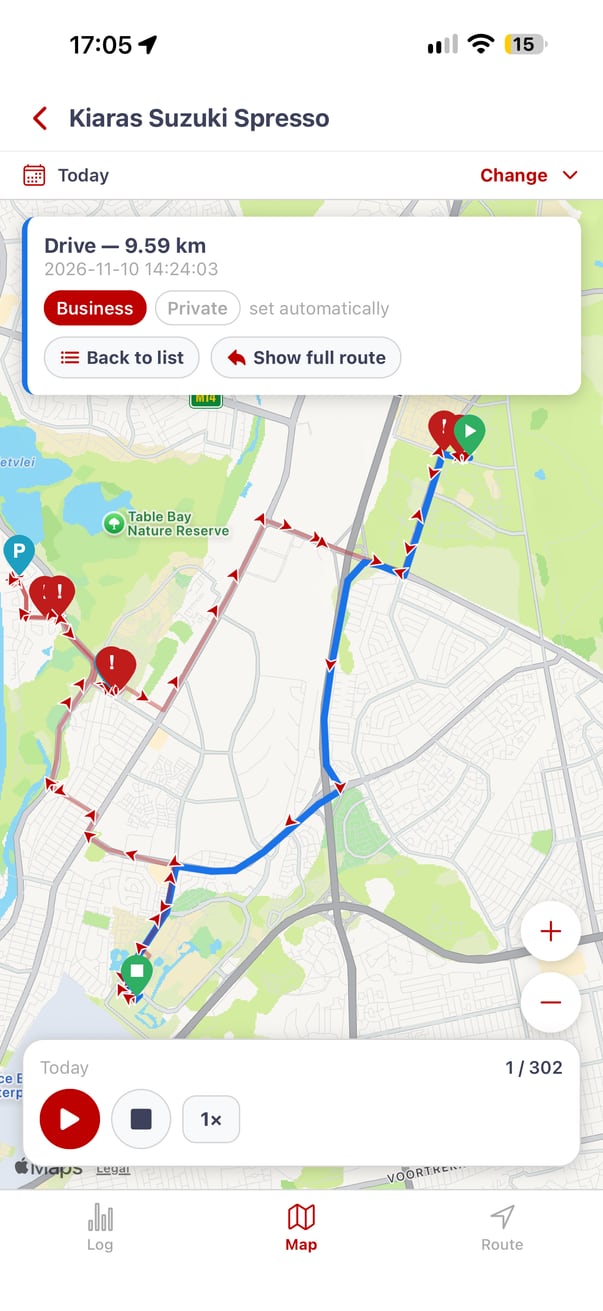
Yes. The business-hours window is set per account, so it follows your real working days and times instead of a fixed 08:00 to 17:00. The closer it matches how you work, the fewer trips you correct by hand.
A plumber on the road from 06:00 gets those first callouts tagged business without touching the app.
If Saturdays are working days, Saturday trips start as business. The Sunday drive to the beach stays private.
Each account gets its own window, so a fleet and a sole trader on different hours are both tagged correctly.
You only step in when a trip doesn’t fit the pattern, like a lunchtime errand or a Sunday client meeting.
Opening and closing odometer readings for the tax year, total and business kilometres, and each business trip with its date, destination, and reason. The travel sheet covers the trip records. You add the odometer readings and a short purpose for business trips.
Every trip with its date, start and end time, start and end address, distance, and business or private type. Export it in PDF or Excel, or schedule it to email itself monthly so your accountant always has the latest record.
PDF or Excel · scheduled monthly emailThe vehicle’s odometer reading at the start and end of the tax year, and a one-line reason for each business trip. Trip history is kept for 90 days, so export monthly rather than once a year. Confirm what you can claim with your tax practitioner.
90 days of trip history · export monthlyR50 a month per vehicle, or R540 a year, with no contract. That one subscription is the logbook, live location around the clock, 90 days of trip history, alerts, and the app. You buy the tracker once and keep it.
Hidden behind the dashboard on permanent power. Logs every trip and works with the optional Stolen Vehicle Recovery add-on and the R199 engine cut-off relay.
The logbook, live tracking, alerts (Geofence In/Out, Overspeed, Ignition ON/OFF, and PowerCut), and the app. R45 a month billed annually. Cancel with 30 days’ notice.
Plugs into the diagnostic port in about 30 seconds. It’s visible and stops tracking if unplugged, so use it for the logbook, not for theft protection.
WhatsApp, call, or email us. We confirm the tracker, installation, and delivery, email an invoice, and you pay by EFT. Prefer to see a price first? Request a quote and decide later.
WhatsApp 083 399 9937, call 021 330 5408, or email info@thetrackingco.co.za. Tell us the vehicle and whether you want it fitted.
We recommend the right tracker, and confirm installation or delivery and the total price before anything is booked.
We email an invoice and you pay by EFT. There are no card payments and no debit orders.
In Cape Town, Johnny books your installation. Elsewhere, the tracker is couriered to you. Once it’s live, the logbook starts on the next trip.
In Cape Town, our own technician fits the tracker at your home, office, or yard for R550 a vehicle, with travel included. Same-day installation is sometimes possible during office hours, so WhatsApp us to check today’s slots. Otherwise we book you in within two working days. Cape Town vehicle tracking.
The Tracking Co is a Cape Town-based GPS vehicle tracking company, trading since 2016. Its iPhone and Android app tags every trip business or private using each account’s own business-hours window, lets the driver change any trip with a tap, and exports a business and private travel sheet in PDF or Excel for SARS.
The logbook is included in the tracking subscription, from R50 a vehicle a month with no contract, alongside live tracking, alerts, and 90 days of trip history. Customers own the tracker outright, from R769 for the hardwired 4G900L. For company cars and pool vehicles, see company vehicle tracking, and for every feature, see the tracking platform.
Yes. The Tracking Co’s tracking app logs every trip a vehicle makes and tags each one business or private, then exports a travel sheet you can give your accountant for your SARS submission. It costs R50 a month per vehicle with no contract, and the same subscription includes live location, trip history, and alerts. The logbook data comes from a GPS tracker fitted to the vehicle, so nothing depends on you remembering to open an app.
In The Tracking Co app on iPhone or Android, open the vehicle’s history and go to the Route list. Every drive shows a Business and a Private button: tap the one that matches the trip. If you change a trip by hand, an Auto option appears that hands it back to your business-hours schedule. The change carries through to the travel-sheet report. If the buttons don’t show, WhatsApp 083 399 9937 and The Tracking Co switches the feature on for your account.
Yes. Every The Tracking Co account has its own business-hours window, so it can match your real working days and times rather than a fixed 08:00 to 17:00. WhatsApp the team if you want help setting it. A tradesperson who starts at 06:00, or a sales rep who works Saturdays, gets trips tagged correctly from the start. Any trip that starts inside the window is tagged business automatically, and everything else is tagged private. You only correct the exceptions.
SARS asks for opening and closing odometer readings for the tax year, total and business kilometres, and a record of each business trip with the date, destination, and reason. The Tracking Co travel-sheet report gives the date, time, start and end address, distance, and business or private type for every trip. Add the year’s opening and closing odometer readings and a short purpose for each business trip. Confirm what you can claim with your tax practitioner.
With The Tracking Co, the logbook is part of the R50 a month tracking subscription, or R540 a year (R45 a month billed annually). There is no separate logbook fee and no contract. The tracker is a once-off purchase: R769 for the hidden, hardwired 4G900L, or R499 for the OBD Mini plug-in. In Cape Town, The Tracking Co’s own technician fits a hardwired tracker for R550 a vehicle, with travel included.
The Tracking Co keeps 90 days of trip history on the platform. That covers any month you want to check or correct, but not a full tax year, so export your travel sheet regularly. The simplest routine is to schedule the business and private travel sheet to email itself on the first of every month, in PDF or Excel. By the end of February you have twelve monthly sheets ready for your accountant.
Yes, with limits. The Tracking Co’s OBD Mini (R499) plugs into the vehicle’s diagnostic port in about 30 seconds and logs every trip while it is connected. It is visible, and tracking stops if someone unplugs it, so it is a logbook device, not theft protection. If the vehicle also needs security, choose the hardwired 4G900L at R769, which is hidden behind the dashboard and works with the optional Stolen Vehicle Recovery add-on.
Hardwired trackers from R769. Subscriptions from R50 a month. No contracts, no setup fee, no surprise upgrades.
Get my quote → Or call the office on 021 330 5408, or WhatsApp 083 399 9937.